
Download Visual MP3 CD Burner – MP3 CD Burner, Audio CD Creator, Music Burning Tool
Overview
Visual MP3 CD Burner is a mobile application designed to help users create physical audio CDs from digital music files. The app supports a variety of audio formats, including MP3, MP2, WAV, OGG, and WMA, enabling users to transfer their digital music collections to durable CD media. This functionality is particularly useful for those who want to preserve music libraries, share audio with others, or use CDs in older devices that lack digital playback capabilities. The app is positioned as a user-friendly tool, aiming to simplify the CD burning process for individuals without technical expertise.
It is intended for a broad audience, including music enthusiasts, educators, event organizers, and anyone needing to archive or distribute audio content. The inclusion of ID3 tag editing and custom CD insert creation adds value beyond basic burning, offering tools for personalization and organization. While the developer did not provide detailed background information, the app’s consistent focus on audio preservation and accessibility suggests a targeted approach to digital media management. In the broader app ecosystem, Visual MP3 CD Burner fills a niche for offline audio distribution and long-term data archiving, especially in environments where digital storage is limited or unreliable.
Key Features & Functionality
- High-Speed Burning: The app supports all IDE, CD-RW, and DVD-RW burners, operating at maximum speeds to reduce waiting time during the burning process. This feature is ideal for users managing large music libraries and seeking efficiency.
- Multi-Format Support: Visual MP3 CD Burner accepts MP3, MP2, WAV, OGG, and WMA files, offering flexibility for users with diverse digital audio sources. This compatibility ensures that most common audio files can be burned without conversion.
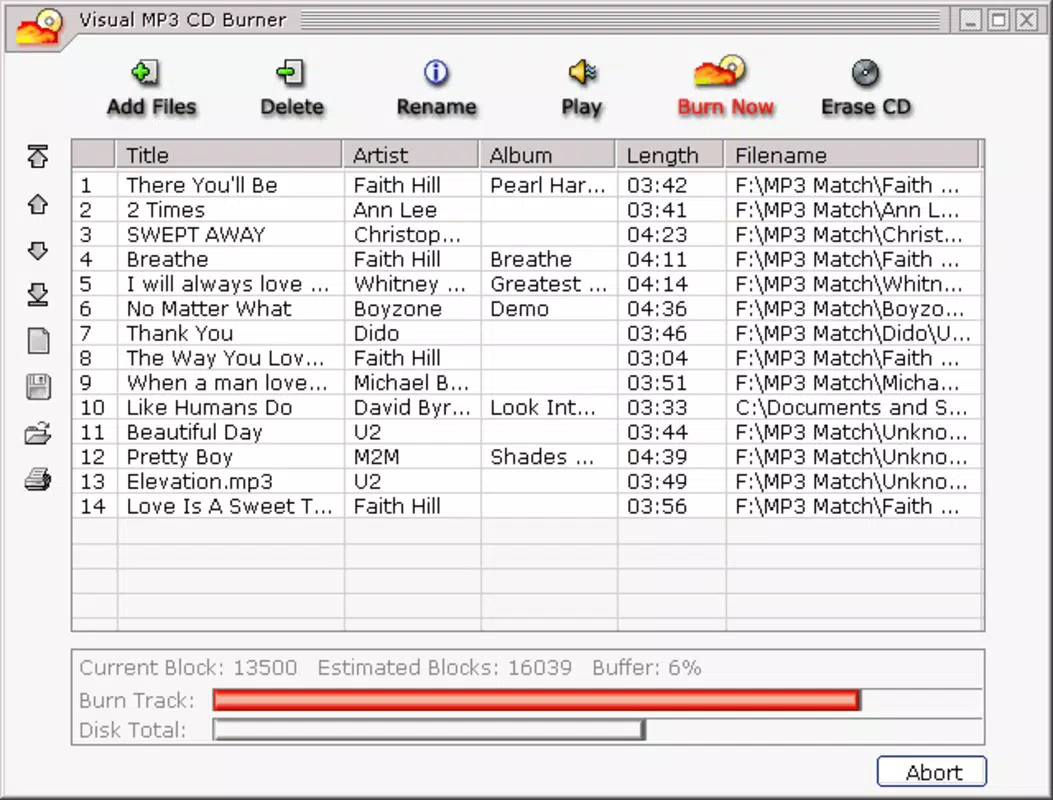
- ID3 Tag Editing: Users can edit metadata such as artist, album, and track title directly within the app. This functionality enhances organization and ensures accurate labeling on the final CD.
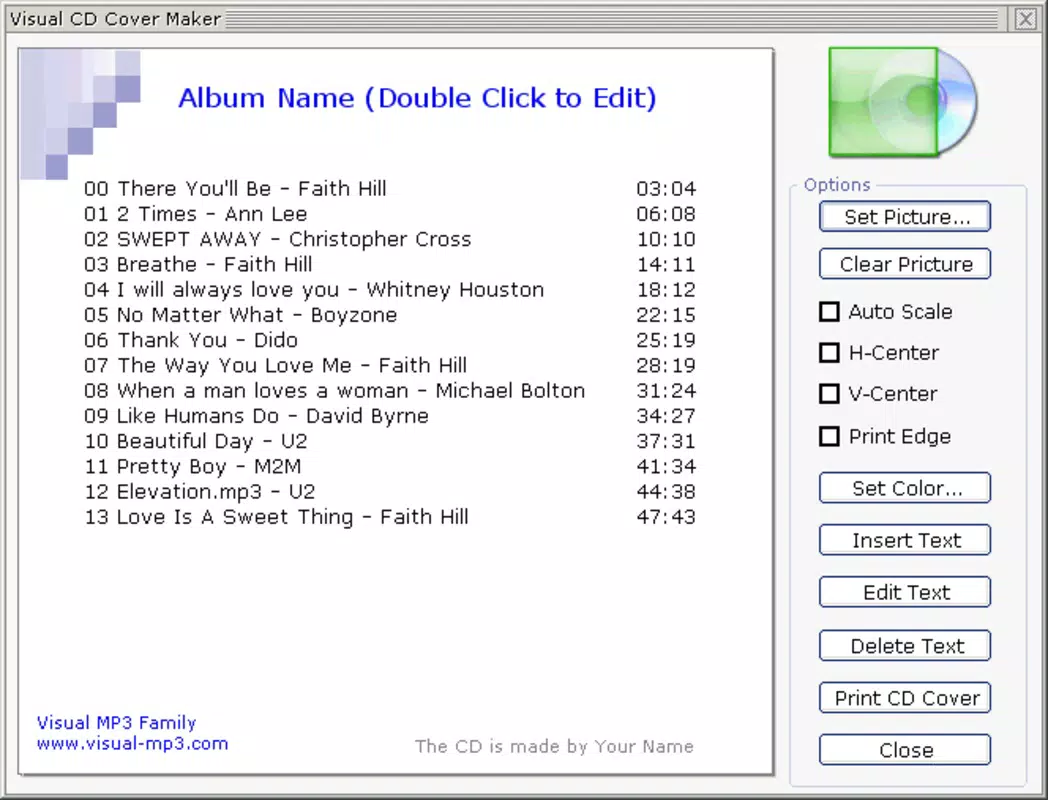
- Custom CD Insert Creation: The app includes a built-in tool to generate personalized CD inserts using text and images. This feature adds a professional and personalized touch to physical music releases.
- Space Monitoring: Real-time tracking of available CD space helps users avoid overloading the disc and prevents errors during the burn process. This feature improves reliability and user confidence.
For example, a music teacher could use the app to create custom audio CDs for students, complete with labeled tracks and printed inserts. A home user might burn a playlist of favorite songs for a road trip, ensuring compatibility with car stereos. The combination of format flexibility, metadata control, and visual customization makes the app a practical tool for both casual and semi-professional use.
Interface, UX & Performance
The user interface of Visual MP3 CD Burner is designed with simplicity in mind, prioritizing ease of access to core functions. Navigation appears to follow a linear workflow: selecting audio files, configuring burn settings, and initiating the process. The layout likely includes clear buttons for file import, burn start, and insert design, minimizing the learning curve for new users.
Visual elements such as progress bars, file lists, and space indicators contribute to a transparent user experience. Although the developer did not list formal performance metrics, the app’s emphasis on high-speed burning suggests optimized processing. Responsiveness is expected to be stable during file selection and burn initiation, though actual performance may vary depending on device capabilities and burner hardware.
Stability during long burns is crucial, and while no crash reports or error logs were provided, the inclusion of space monitoring indicates a design focused on preventing failures. The app’s performance on different device categories—such as budget, mid-range, and high-end smartphones—was not specified. However, the absence of complex animations or resource-heavy features suggests it is lightweight and likely to function consistently across a range of devices.
Platform Compatibility & Technical Requirements
Visual MP3 CD Burner is available on Android, though specific OS version requirements were not listed. The app’s file size is 2.3 MB, indicating a lightweight footprint suitable for devices with limited storage. It is designed to work with various CD and DVD burners, though the exact compatibility details were not disclosed.
The developer did not specify minimum OS requirements or hardware prerequisites. As such, users should ensure their device supports external burner connections or has built-in CD/DVD capabilities. The app’s version is 1.0.0, and it was released on July 4, 2013. Given its age, compatibility with modern Android versions may be limited, and users should verify functionality on their specific device.
Pros and Cons
Pros
- User-friendly interface suitable for non-technical users.
- Supports multiple audio formats including MP3, WAV, and OGG.
- Includes ID3 tag editing for better music organization.
- Offers custom CD insert creation for personalized output.
- Real-time space monitoring prevents burn errors.
Cons
- App version is outdated (released in 2013).
- Compatibility with modern Android devices is uncertain.
- Developer did not provide OS or hardware requirements.
- No information on app updates or maintenance.
- File size is small, suggesting limited feature expansion.
FAQ
Is Visual MP3 CD Burner safe to download and install?
The app is available through official distribution channels and does not require root access. However, users should verify the source to ensure authenticity, especially given the app’s age.
Can I use this app on iOS devices?
Based on the available information, the app is designed for Android. There is no confirmation of iOS compatibility.
Does the app require a CD burner to function?
Yes, the app requires a compatible CD or DVD burner. This can be an internal drive or an external USB-connected device.
Are there any in-app purchases or ads?
The provided information does not mention in-app purchases or advertisements. The app appears to be a one-time purchase or free download, though pricing details were not specified.
How often is the app updated?
The app was released in 2013, and no update history or release notes were provided. Users should expect limited or no future updates.
Final Thoughts + CTA
Visual MP3 CD Burner remains a functional tool for users who need to convert digital music into physical audio CDs. Its support for multiple formats, ID3 editing, and custom insert creation offer practical benefits for music archiving and distribution. While the app’s age raises concerns about modern compatibility, its core features remain relevant for those with older devices or specific offline needs.
For music lovers, educators, and hobbyists who value tangible media, this app provides a straightforward solution. Despite its outdated release date, it continues to serve a niche audience seeking reliable CD creation without complex workflows.
Download Visual MP3 CD Burner now


